Main page
Commercially supported plugins
We do support some plugins commercially introducing new features or making it compatible with newer version of Redmine. Your feedback and ideas are welcome!
Besides the paid plugins we provide the Community with a set of free plugins too - please find them below.
With respect to the Redmine project licensing and with appreciation for the Community we do not encrypt or obfuscate the source code*. You are welcome to make your own adjustments to cover your specific needs
*this policy might be a subject of change as it depends on future market conditions
By paying for the commercialy supported plugins you provide us with budget for development and maintenance of the plugins. Thank you for being honest in that regard!
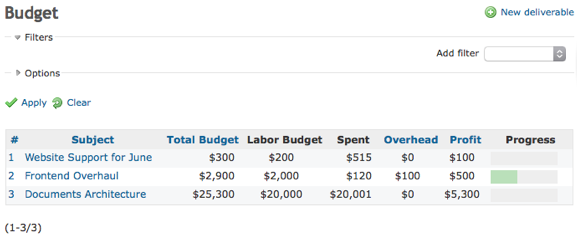
Redmine Budget
Turn your time into money. Keep track of profit, cost and analyze overall financial performance across your projects.
Start budgeting
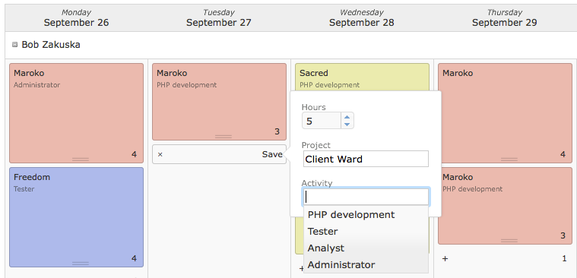
Redmine Schedule
Schedule workforce with ease and confidence. Change plans, find replacements, and get people to work.
Start scheduling
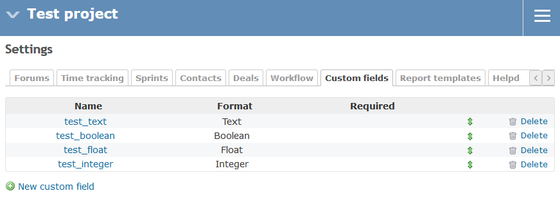
Redmine Project Specific Custom Field
Make Redmine ever more cutomizable with possibility to adapt your projects with different characteristics to your needs. Give more power to your project managers and unclatter your administration panel.
Make it even more customizable
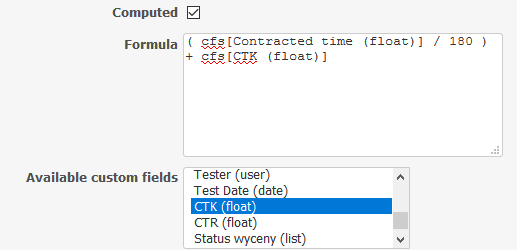
Redmine Computed Custom Field
Make you Redmine even more useful with a feature that allows you to configure custom fields with mathematical formula that is calculated each time you make an upadate to customized object.
Make it even more poweful
Redmine Invoice Reminder
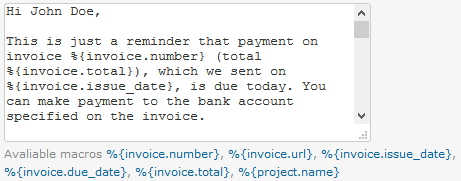
Make it easier to issue and propagate a notice to your customers about invoice incoming or due payments. Automatically send emails as a kind reminder based on invoices issued with Redmine Invoices plugin.
Improve your payments due
Redmine Leaves Holidays
Make your Redmine a complete system for leaves management. Integrate your leaves approval with the system time tracking and increase the transparency of the process to everybody in your organization.
Manage your leaves efficiently
Any question about our plugins? Please e-mail us at:
redmine.support@omegacode.pl
We’re open for your feedback and new features suggestions. There is always space for improvement!
Free plugins
Redmine Inline Edit Issues
Bulk edit many issues and multiple values for selected issues in a convenient way. It speeds up consideribly workflow of editing the tasks.
Redmine Rate
Manage billable rates and costs based on logged time.
Redmine Impersonate
Allow administrators to login as any user with a single click.
Redmine Shady
Temporarily disable sending e-mail notifications triggered by user.
Redmine Edit Author
Change author of issues.
Redmine Lockout
Locks previous months time entry. Great for getting better control over billing and timesheets for users.
Redmine Admin Acess
Grant access to some of the Redmine administration panel features for specific users.
Redmine Better Selectbox
Significantly improves selectbox in Redmine by making it searchable with real-time filtering.
Any question about our plugins? Please e-mail us at:
redmine.support@omegacode.pl
We’re open for your feedback and new feature suggestions. There is always space for improvement!
Redmine Budget
Turn your time into money. Keep track of profit, cost and analyze overall financial performance across your projects.
Redmine provides extensive possibilites of planning and organizing work more agile to deliver faster and make our craft even better.
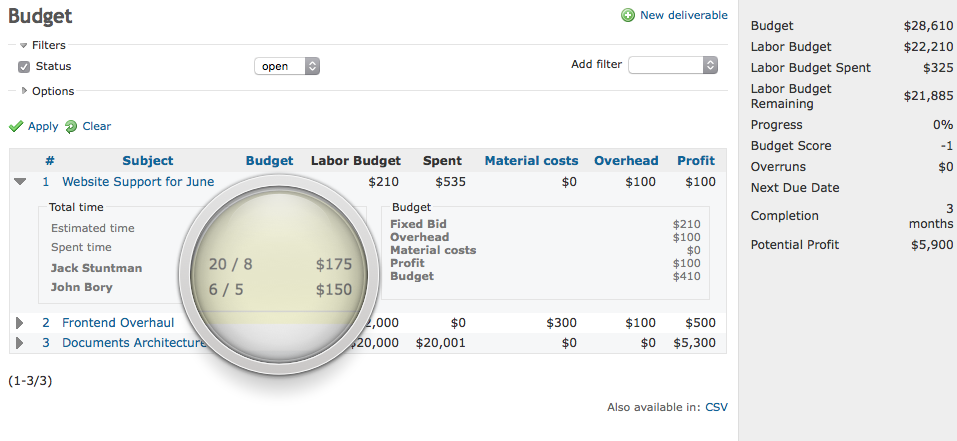
With Budget, in addition to keeping track of people work and time, it is possible to manage labor costs, set profit goals and gain insight into precious financial data from the past in order to plan and predict future more accurately.
You can use Budget plugin alongside our other plugin Schedule to plan on specific Deliverables besides the whole Project
Redmine Budget plugin requires Redmine Rate plugin which is made available free of charge and is also supported by us.
Try our free Demo
Buy now*
*includes one-year of updates
Keep track of time & money
Redmine is the best open-source project management and time tracking platform. With Budget, it is finally possible to manage money, payouts and projects in a single place:
- See cost of employees’ work based on time tracking (thanks to agnostic open-source Rate plugin bundled with Budget).
- Measure overall performance of your team based on deliverables & issues forecasts.
- Get to know if everything is on track, both financially and timely.
Deliverable
Plan budget for every product you want to deliver, be it a document, server configuration, design or anything that is deliverable to your clients. Calculate costs, set profits, assign issues and people to be on top of everything.
Bill hourly or set fixed price depending on requirements. Get overeview of your projects’ financical performance in na glimpse. Divide and rule: group and split tasks to make managing finances easier.
Hourly Rates
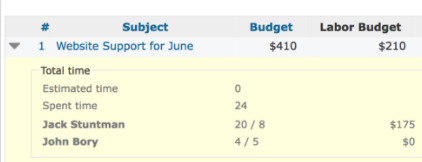
Specify hourly rates for employees to see not only spent time but every penny that is floating around with it. Every employee can have different rate for each project accross varied periods of time.
Customizable
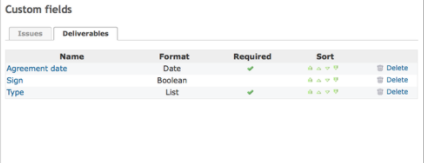
Use Redmine functions you know such as Custom Fields, Statuses and permissions to adjust everything to your workflow.
Calculator
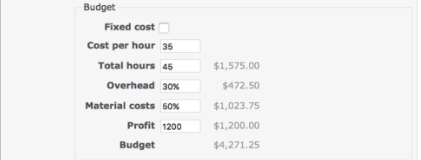
Bill dynamically based on hourly rates or set fixed costs with other factors like profit to make sure everything is in its right place.
Assigns
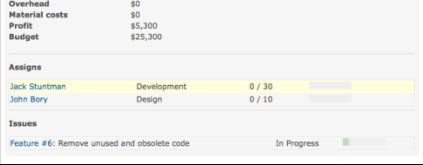
Assign time for individual people and type of work within deliverables to breakdown costs and see performance of employees.
Access Control
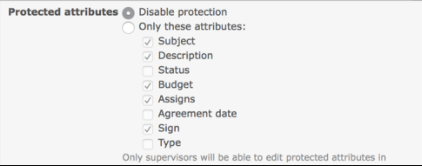
With protected fields and budget supervisor features you can be sure that budget and numbers are consistent durning development.
Workflows
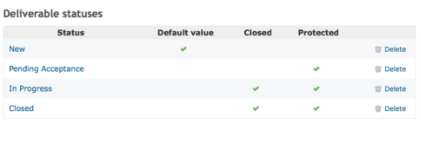
Deliverable statuses combined with access control features allows to define custom workflows for managing and planing a budget.
Try our free Demo
Buy now*
*includes one-year of updates
Setup instructions
Please ALWAYS make preliminary installation and tests of the plugin on development environment before proceeding to setup on production server.
1. Credits
Redmine Budget is based on Eric Davis’ work which was released by him to the community. Unfortunetly, project was abandoned. We really liked it and decided to completly rewrite (with keeping compatibility) and make it even better. If you are already using Eric’s version (or forks which didn’t make any changes to database) you can use this plugin as drop-in replecament.
This plugin also depends on Redmine Rate plugin which is bundled with Budget for your convenience.
2. Installation
Before processing it is recommended to backup your Redmine instance, both files and database (!)
Follow Redmine standard plugin installation steps:
- Upload redmine_budget/ and redmine_rate/ directories to plugins/ inside Redmine root directory.
- From shell, still inside Redmine directory, run rake redmine:plugins:migrate.
- Restart Redmine instance.
- Open Redmine inside your browser.
3. Setup permissions
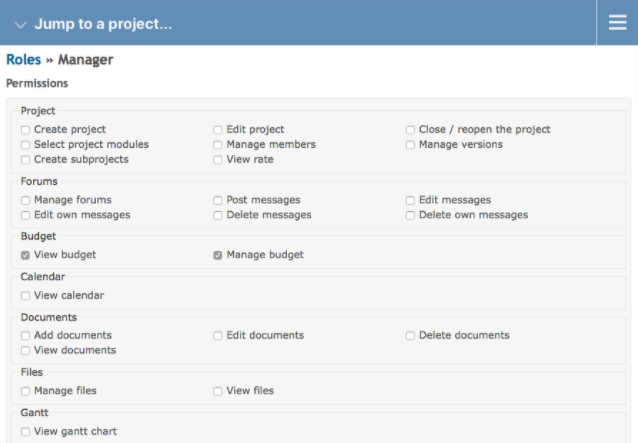
Setup permissions for roles that should have access to Budget in Administration » Roles and permissions.
It is possible to grant read na write access to project’s budget.
4. Enable Budget for your projects
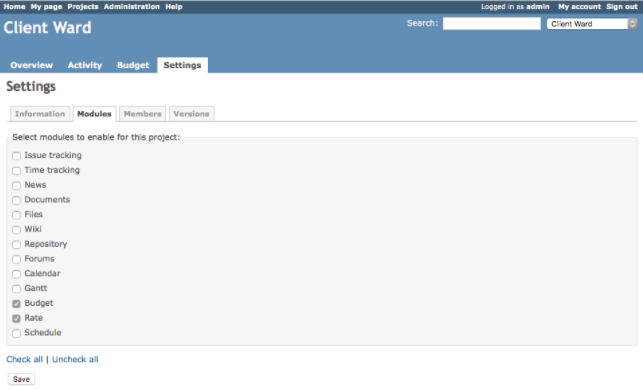
In order to use Budget, you have to enable it for each project.
To utilize benfeits of of financical management and planning provided by Budget, go to project Settings » Modules, and select Budget (make sure that Rate is also selected).
5. Specify rates for users
In order to utilize full potential of Budget, you have to fill up hourly rates for users that are going to work on projects with budget.
To do so, go to the project which has already enabled Budget module and visit Settings » Members.
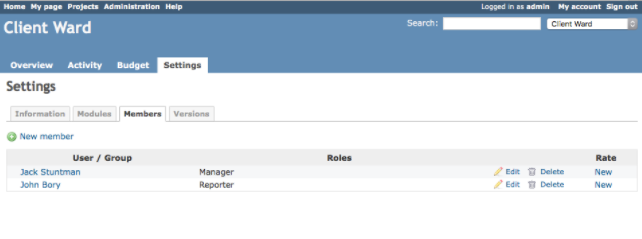
Click Create in the Rate column to specify a hourly rate for a given user.
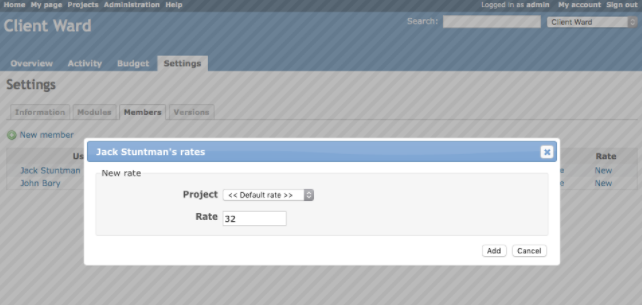
Hourly rates can be specified for different projects for each user. Project field is the context in which given rate will take effect. However, it is possible to not specify it which will create rate shared across projects (this option is default, as showed on figure above). Amount field is the amount of money in your currency for user’s hourly rate.
Fill up forms and click Add. Repeat this step to other users you wish to specify rates.
6. Create your first deliverable
Now, after all this drudgery, you can finally start using Budget.
Visit Budget » New deliverable to create new deliverable.
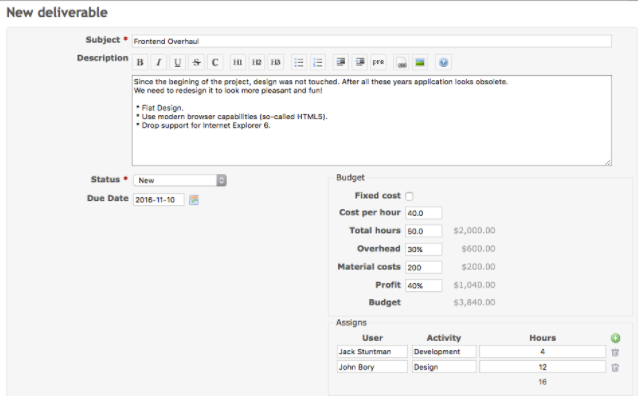
As you can see in above figure, creating deliverables looks pretty similar to issues:
- Subject is used to name and identify deliverable.
- Description is a great place to tell more about deliverable and it’s product(s), client information, requirements and so on.
- Status indicate what is the phase of deliverable. By default there are 3 statuses: New, In Progress, Closed. Statuses can directly affect deliverable by:
- speeding up process of filtering and searching across deliverables,
- changing visibility of deliverable across Redmine (in Issue’s Deliverable custom field, etc),
- hiding it off from list to avoid clutter,
- restricting users’ from changing information using protected attributes.
- You will learn more about statuses after few more steps of this tutorial.
- Budget section is an interactive calculator to quickly calculate and estimate costs, overhead and profit.
- Assigns allows to assign specific task for every member of a project to track their performance based of logged time. It is possible to use custom values for Activity field by visiting Administration » Enumerations.
7. Set issues
Deliverables are highly tied to Redmine core feature - issues.
Issues in projects with Budget enabled can be linked to deliverable direclty in issue’s page.
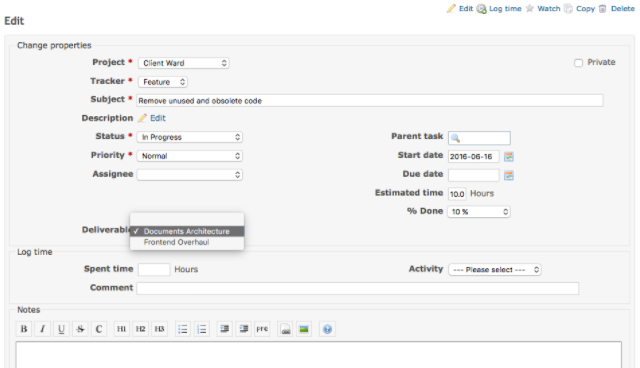
Budget will pull out all meaningful information from issues like logged time, due dates into single place and automatically calculate costs, profits and other factors accordingly.
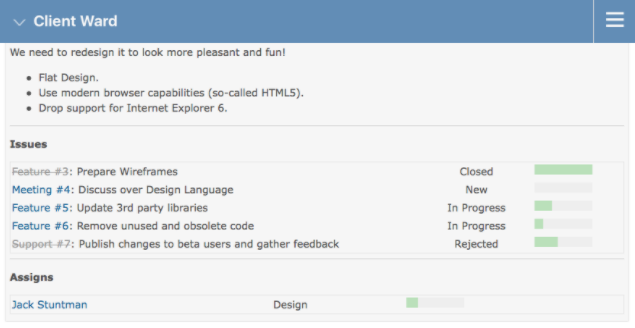
8. Statuses & Workflows
Redmine Budget provide powerful features that, when combined can be used to create custom processes and workfows for budgeting in your organization.
As you may know, statuses can directly affect deliverables, similary to issues.
To see existing statuses and create new ones go to Administration » Deliverable statuses. Click New status.
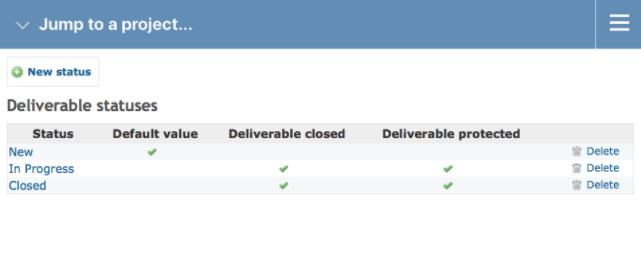
Statuses can affect deliverables based on two properties:
- Deliverable marked as closed don’t show up on the list by default and cannot be assigned to issues and edited in order to keep historical records.
- Deliverable marked as protected restrict access based on protected attributs that can be set in plugin’s settings.
Default statuses are pretty basic so don’t hesitate to play around with them and create your own workflows for your organization.
9. Settings
Configuring protected attributes and other features can be done in settings page. Go there by visiting Administration » Plugins, find Redmine Budget and click Configure.
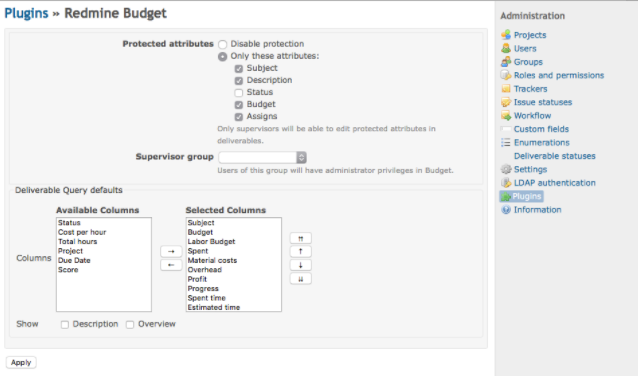
- You can select attributes which won’t be editable if deliverable is marked as protected through statuses.
- It is possible to specify Supervisor group. Users in this group will be able to edit all deliverables, even protected ones.
- Customize default deliverable queries with selected columns and two additional options for extending default deliverable list page:
- to add descriptions below every deliverable,
- to show compact information about whole deliverable, sucha as: issues, assigns, spent time.
If you would like to extend deliverables with your custom attributes, you can do so in Administration » Custom fields.
Also, if you would like to allow non-administrators access and manage rates, checkout Redmine Rate settings.
10. Conclude
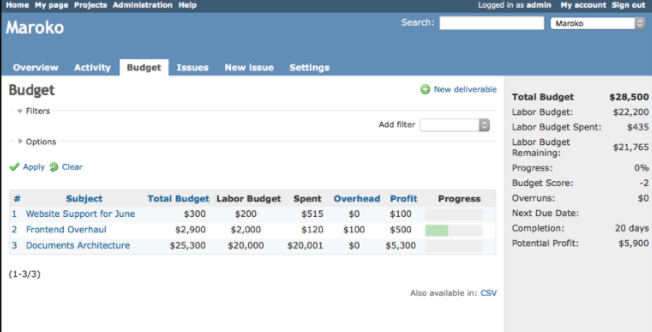
As times goes by you will have more and more projects to deliver. The beautiful thing about Budget is that it progressively become more useful as it has more information to process.
Try our free Demo
Buy now*
*includes one-year of updates
Changelog
1.0.5 (2020-02-24)
 - [Fix] Deliverable status update had no effect or threw exception

1.0.4 (2020-02-02)
 - [Fix] Deliverable status edit view not rendering properly

1.0.3 (2020-02-02)
 - [Fix] Random crashes after migrating to 4.1
 - [Feature] Deliverable statuses now use reorder handle instead of reorder buttons

1.0.2 (2020-02-02)
 - [Fix] Upgrade from 3.4 to 4.1 caused db migration fail

1.0.1 (2020-01-31)
 - [Fix] Deliverable grid sort cause crash

1.0.0 (2020-12-27)
 - [Feature] Compatible with Redmine 3.4 and 4.1

0.12.4 (2018-12-31)
 - [Fix] Fixed issues redirect link

0.12.3 (2017-12-28)

 - [Feature] Polish Translation
 - [Feature] German translation
 - [Feature] Update do redmine 3.4

0.12.2 (2017-07-06)

 - [Fix] Deliverable error when using PostgreSQL database.

0.12.0 (2017-05-30)

 - [Fix] Deliverable "Spent" column no longer includes fixed cost in its
    value.
 - [Fix] Project Budget Summary error when using PostgreSQL database.

0.11.0 (2016-12-30)

This version comes with rethinked deliverable statuses that let you create
more sophisticated workflows and support for standard Redmine features like
attachments and saved queries along with a lot of fixes and small improvements.

 - [Feature] Deliverable status workflow transition.
 - [Feature] Saved queries for deliverables.
 - [Feature] Attachments for individual deliverables.
 - [Feature] Move deliverables between projects.
 - [Feature] Persistent query options within user session.
 - [Feature] Define protected fields based on deliverable status.
 - [UI] More readable deliverable overview on list.
 - [UI] Added Estimated Time and Spent Time next to deliverable fields.
 - [Usage] Change "protected attributes" name to "protected fields".
 - [Usage] Support raw queries on Rails 4 when calculating project budget for
    better performance.
 - [Usage] Add "Set deliverable" permission to allow users without Budget access
    to assign deliverables to issues.
 - [Usage] Deliverable assigns in list overview now display all assigns.
    Previously, only users with logged time were shown.
 - [Usage] Show multiple roles for each assigned user in list overview.
 - [Usage] When using "Issues" link in deliverable overview, all issues will be shown.
 - [Fix] Deliverable status filter.
 - [Fix] Support for native datepicker for Windows 10.
 - [Fix] Keep Issue-Deliverable relationship integrity when deliverable is deleted.
 - [Fix] Total Estimated Time calculation when issues with same deliverable were nested.
 - [Fix] Settings for menu visibility.
 - [Fix] Budget calculation when percentage value was used in "Overhead".
 - [Fix] Rounding "Cost" column value when zero.
 - [Fix] Error caused by custom fields on Redmine 2.x.

0.9.0 (2016-10-19)

Initial public release.
1.0.5 (2020-02-24)
- [Fix] Deliverable status update had no effect or threw exception
1.0.4 (2020-02-02)
- [Fix] Deliverable status edit view not rendering properly
1.0.3 (2020-02-02)
- [Fix] Random crashes after migrating to 4.1
- [Feature] Deliverable statuses now use reorder handle instead of reorder buttons
1.0.2 (2020-02-02)
- [Fix] Upgrade from 3.4 to 4.1 caused db migration fail
1.0.1 (2020-01-31)
- [Fix] Deliverable grid sort cause crash
1.0.0 (2020-12-27)
- [Feature] Compatible with Redmine 3.4 and 4.1
0.12.4 (2018-12-31)
- [Fix] Fixed issues redirect link
0.12.3 (2017-12-28)
- [Feature] Polish Translation
- [Feature] German translation
- [Feature] Update do redmine 3.4
0.12.2 (2017-07-06)
- [Fix] Deliverable error when using PostgreSQL database.
0.12.0 (2017-05-30)
- [Fix] Deliverable "Spent" column no longer includes fixed cost in its
value.
- [Fix] Project Budget Summary error when using PostgreSQL database.
0.11.0 (2016-12-30)
This version comes with rethinked deliverable statuses that let you create
more sophisticated workflows and support for standard Redmine features like
attachments and saved queries along with a lot of fixes and small improvements.
- [Feature] Deliverable status workflow transition.
- [Feature] Saved queries for deliverables.
- [Feature] Attachments for individual deliverables.
- [Feature] Move deliverables between projects.
- [Feature] Persistent query options within user session.
- [Feature] Define protected fields based on deliverable status.
- [UI] More readable deliverable overview on list.
- [UI] Added Estimated Time and Spent Time next to deliverable fields.
- [Usage] Change "protected attributes" name to "protected fields".
- [Usage] Support raw queries on Rails 4 when calculating project budget for
better performance.
- [Usage] Add "Set deliverable" permission to allow users without Budget access
to assign deliverables to issues.
- [Usage] Deliverable assigns in list overview now display all assigns.
Previously, only users with logged time were shown.
- [Usage] Show multiple roles for each assigned user in list overview.
- [Usage] When using "Issues" link in deliverable overview, all issues will be shown.
- [Fix] Deliverable status filter.
- [Fix] Support for native datepicker for Windows 10.
- [Fix] Keep Issue-Deliverable relationship integrity when deliverable is deleted.
- [Fix] Total Estimated Time calculation when issues with same deliverable were nested.
- [Fix] Settings for menu visibility.
- [Fix] Budget calculation when percentage value was used in "Overhead".
- [Fix] Rounding "Cost" column value when zero.
- [Fix] Error caused by custom fields on Redmine 2.x.
0.9.0 (2016-10-19)
Initial public release.Any question about our plugins? Please e-mail us at:
redmine.support@omegacode.pl
We’re open for your feedback and new features suggestions. There is always space for improvement!
Redmine Schedule
Scheduling workforce is hard and unpredictable.
Schedule is a workforce scheduling solution for Redmine that makes it easy to change plans, find replecements and get people to work.
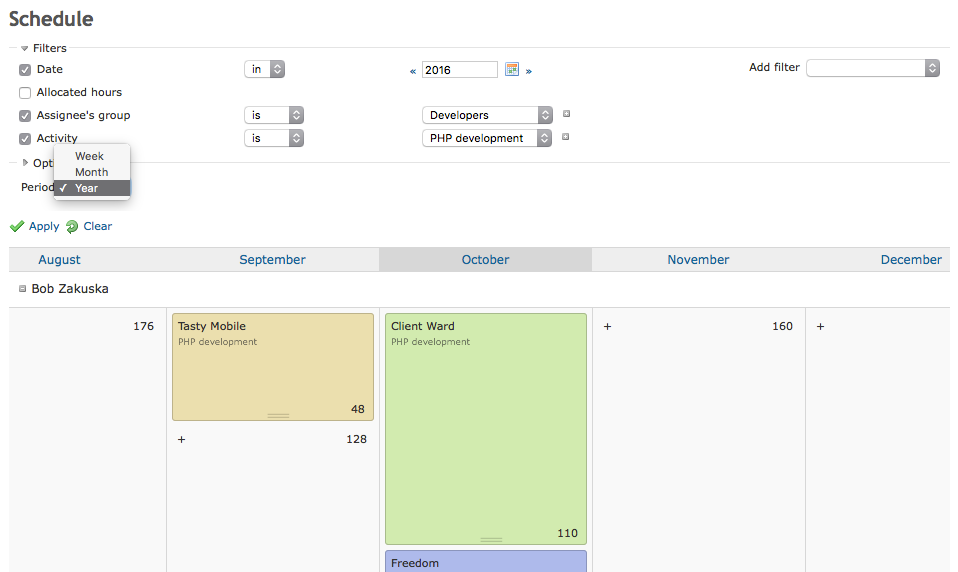
Admittedly there are some plugins for resource planning for Redmine but they tend to be quite strict and require using issues and specific dates for planning which might be cumbersome. Schedule plugin provides more simple approach that allows to schedule resources for the whole Project or Deliverables (coming from Budget plugin) using periods (day, week, month, year). It may be more viable is some use cases, easier to manage and update on higher level. Please check it out on our demo site.
Try our free Demo
Buy now*
*includes one-year of updates
Plan on every level
Days are long, deadlines are short.
Successful planning requires long-term thinking and knowladge about conditions your team will have to face in the future.
Schedule allows you to view people’s schedules across different periods: day, week, and month in order to let you see everything from different perspectives.
Futhermore, thanks to built-in algorithms, it is possible to manage and edit schedules across different periods to make planning even more robust.
Interacive interface for managing workforce
Schedule is so simple and intuitive to use that it doesn’t require much effort to understand it. Introducing it to organization will help to:
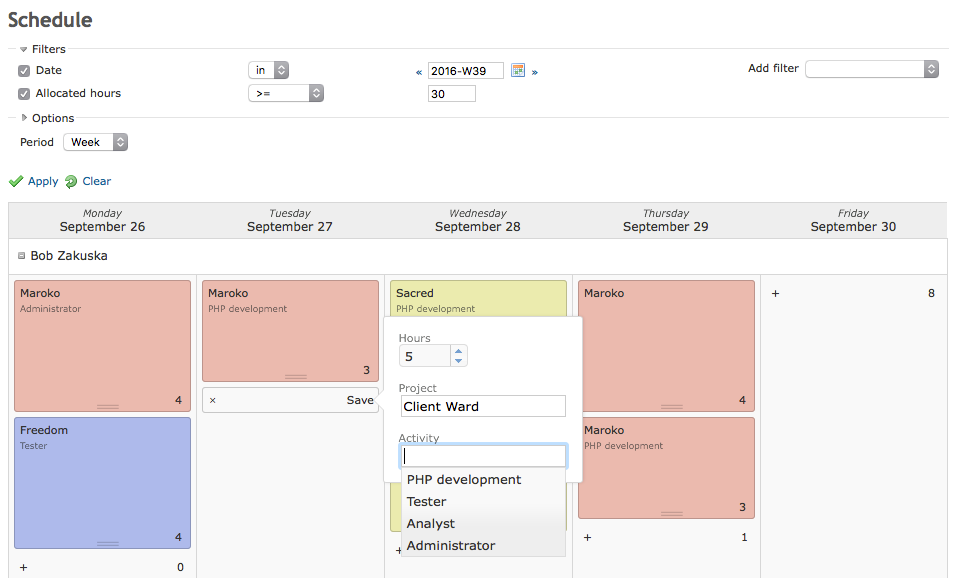
- Manage and plan workforce throughout the time to make sure that your company have enough resources to meet deadlines and make people happy.
- Know what is happening and what everyone is doing in a glimps thanks to clean interface and powerful filters.
- Plan confidently without suprises by knowing about employees’ unavailability due to vacations, sick leaves and public holidays.
Interactive Interface
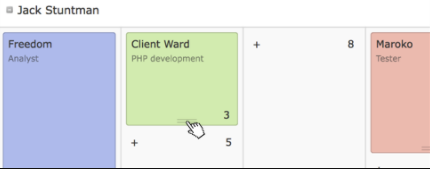
Spreadsheets time is over. Use cards with contextful colors to represent labor workforce with drag and drop interface.
Powerful Filters
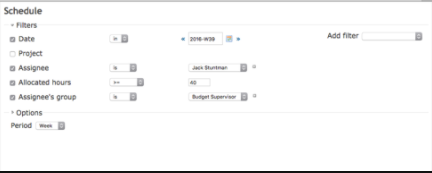
Easily find understaffed projects, replacements and people with too much free time on their hands to increase efficiency in management.
Perspectives
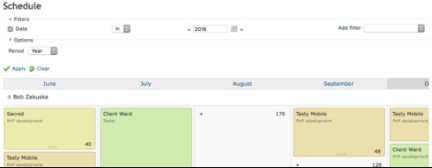
Manage schedules across differents periods to see everything from different perspectives.
Workflows
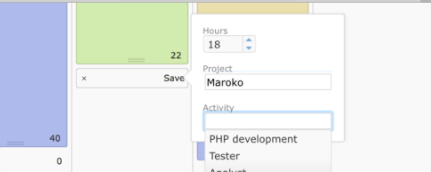
Every company have different policies. Schedule for Redmine is flexible in order to let you define your workflow, not other way around. Specify who can plan, for whom, for what and how with ease.
Deliverables
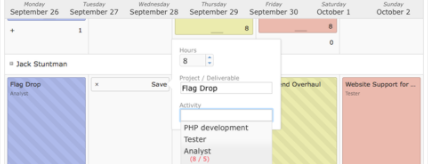
Using Schedule with Budget makes planning efforts more meaningful in context of project budget thanks to deliverable assignments.
Validation
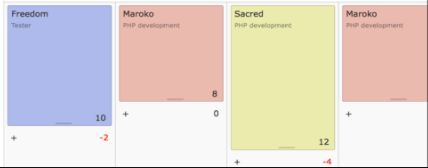
When planning, it is easy to make mistakes. Fixing them costs time and money. You can add custom validation methods such as working hours limit, holidays/vacations to minify errors.
Holidays

Register sick leaves, vacations and get informed about public holidays in your country and see them in schedules.
Export
Export Schedule entries to other programs to process data futher: Use Excel to analyze and manipulate informations you care about.
Try our free Demo
[Buy now*](https://gumroad.com/l/redmine_schedule
*includes one-year of updates
Setup instructions
Please ALWAYS make preliminary installation and tests of the plugin on development environment before proceeding to setup on production server.
1. Installation
Before processing it is recommended to backup your Redmine instance, both files and database (!)
Follow Redmine standard plugin installation steps:
- Upload redmine_schedule/ directory to plugins/ inside Redmine root directory.
- From shell, still inside Redmine directory, run rake redmine:plugins:migrate
- Restart Redmine instance.
- Open Redmine inside your browser.
2. Setup permissions
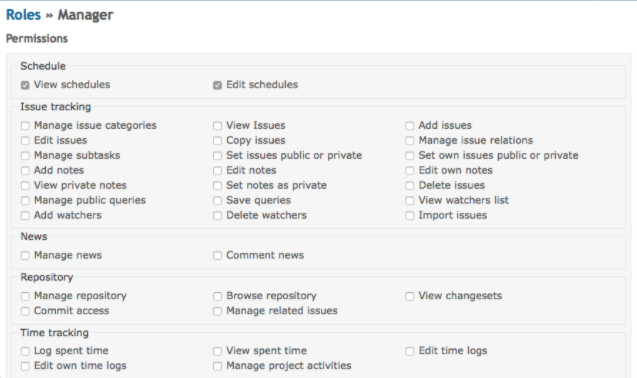
Setup permissions for roles that should have access to Schedule in Administration » Roles and permissions.
3. Enable Schedule for your projects
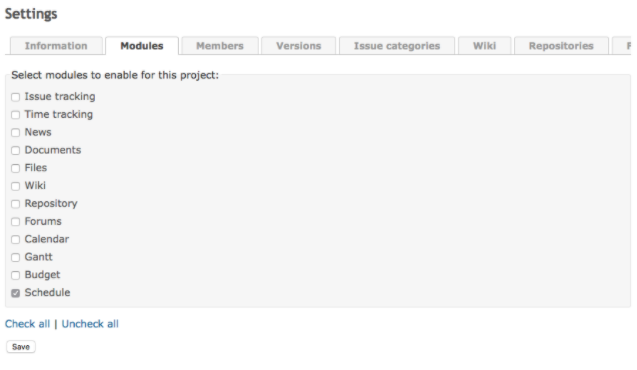
In order to enable scheduling capabilities for individual project, Schedule module needs to be enabled at Settings » Modules.
4. Scheduling
After all these steps, let’s get to work by scheduling others people’s work which is the main faculty of Schedule!
Cards are main concept of Schedule - they represent assignment for given user, project, and activity. To create new card, click plus sign, select how many hours to assign and fill other fields. After save, new colorful card will show up on the screen.
Futhermore, every element on Schedule board is interactive. It is even possible to edit existing assignments by clicking bar at the bottom of the card and dragging cursor around to adjust hours. To delete it, drag mouse to the top.
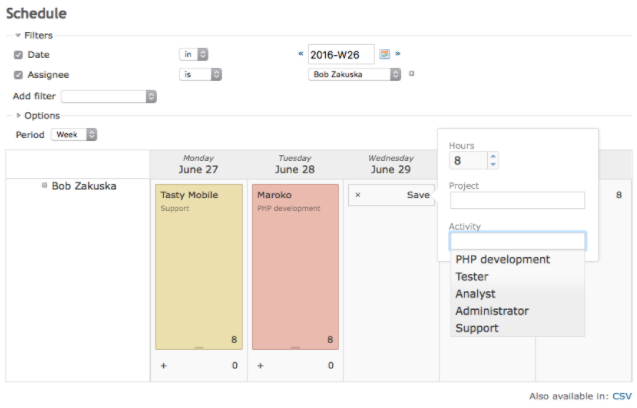
By default you have to schedule every day separately. It is, however, possible to schedule multiple days with a single click.
Below filters you can find Period field which allows to change scheduling intervals. Assigments on day-to-day basis are smartly allocated by Schedule itself. Check it out by assigning something within Month period and going back to Week. Magic!
5. Configuration
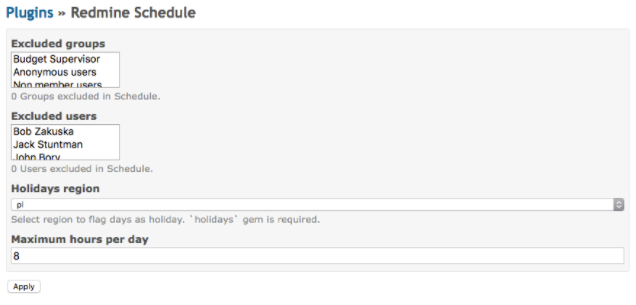
Schedule, in it’s basics, tries to don’t get in a way. You can visit Plugins » Redmine Schedule settings page to discover many useful features like holidays support, hidden-by-default users and groups.
- Holidays support with option to disable assigning times on holidays which keeps planing mistakes away.
- Ability to fully hide users and groups in Schedule. This is really useful in case you are using Redmine with employees along with customers and partners.
- Specify custom working hours in case your company endorse other-than-8-hours workday.
Try our free Demo
Buy now*
*includes one-year of updates
Changelog
1.0.2 (2020-02-02)
- [Fix] Exception after migrating to 4.1

1.0.1 (2020-02-01)
- [Fix] Upgrade from 3.4 to 4.1 caused db migration fail

1.0.0 (2020-12-21)
- [Feature] Compatible with Redmine 4.1 and 3.4

0.11.0 (2016-12-30)

 - [Feature] Move user's cards between intervals with drag'n'drop.
 - [Fix] Settings for menu visibility.

0.9.0 (2016-10-19)

Initial public release.
1.0.2 (2020-02-02)
- [Fix] Exception after migrating to 4.1

1.0.1 (2020-02-01)
- [Fix] Upgrade from 3.4 to 4.1 caused db migration fail

1.0.0 (2020-12-21)
- [Feature] Compatible with Redmine 4.1 and 3.4

0.11.0 (2016-12-30)

 - [Feature] Move user's cards between intervals with drag'n'drop.
 - [Fix] Settings for menu visibility.

0.9.0 (2016-10-19)

Initial public release.
Any question about our plugins? Please e-mail us at:
redmine.support@omegacode.pl
We’re open for your feedback and new features suggestions. There is always space for improvement!
Redmine Project Specific Custom Field
Make Redmine ever more cutomizable with possibility to adapt your projects with different characteristics to your needs. Give more power to your project managers and unclatter your administration panel.
Plugin allows you to create and manage issues custom fields (CF) for individual projects seperately. This way it provides a feature for customization of the system per project basis without resorting to administration panel.
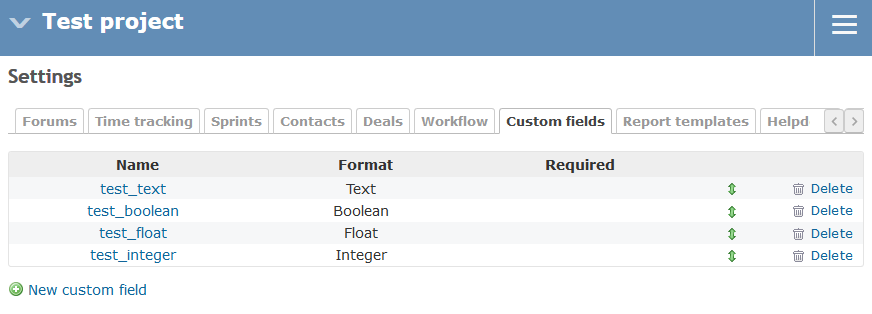
Project specific custom fields are managed in project settings and it is possible set a custom workflow for each of them adjusting it to your heart desire.
You can use Project Custom Field plugin alongside our other plugin Computed Custom Field to get even more powerful effect.
Try our free Demo
Buy now*
*includes one-year of updates
Description
Plugin allows you to:
- Create, edit and delete project specific custom fields
- Configure project specific custom fields by setting it’s attributes (similarily to Redmine core and global custom fields with some more options)
- Set a project specific worfklow for project specific custom fields.
All these features are provided on project level thus making it possible to setup configuration by project manager alone without need of administrative support.
It encourages the project manager to adjust the project to his needs and offload system administrators in the process. The important and powerful side effect is that your adminstration panel becomes unclattered from project specific configurations, cleaner and easier to manage. Use your administration panel to configure what’s general and commonly used and put all the intrinsic details where they belong, below in the hierarchy into the projects.
Project settings
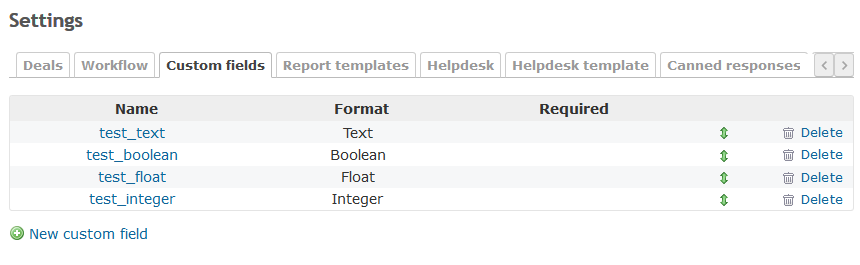
Manage you project specific custom fields under your project settings:
- create
- edit
- delete
- sort with drag and drop
Manage project custom field
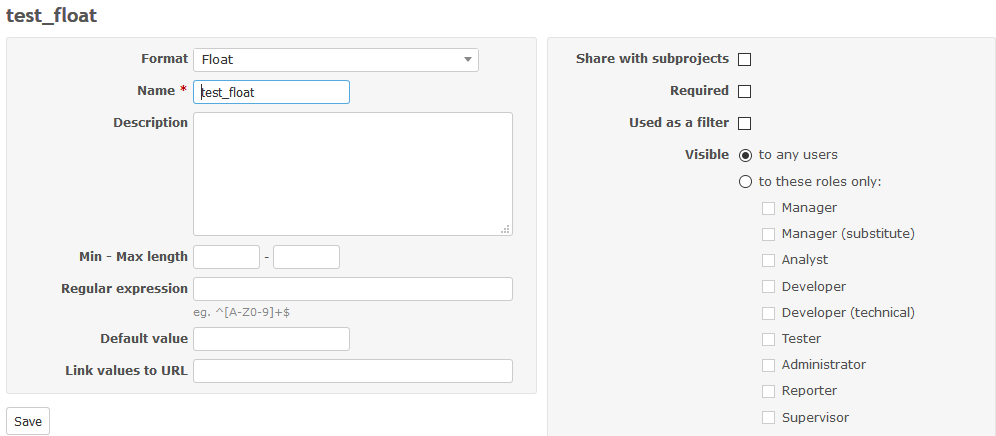
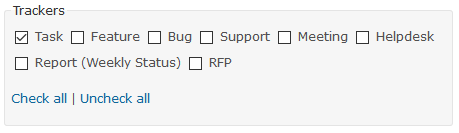
Configure your project specific custom field similarily as with core (global) custom field. Set:
- trackers
- format, name, description etc.
- visibility to roles
- share with subprojects flag
- this allows you create a nice multiproject hierarchy structure. this way you can facilitate further management, e.g. by setting List type custom field to be shared among several subprojects
- computed flag (only with Computed Custom Field)
Workflow for the project custom field
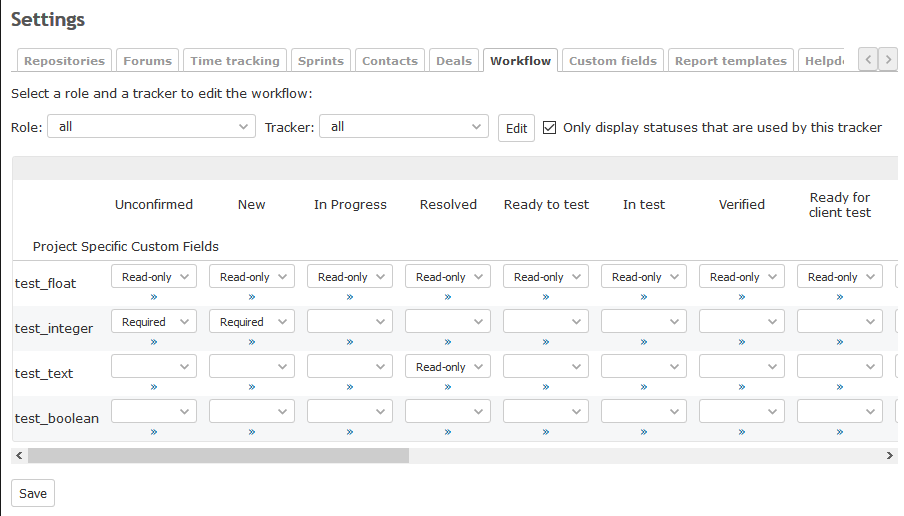
Set a custom workflow for the project specific custom fields. Make their behaviour (eg. read only, required) dependent on:
- role
- tracker
- issue status
Features under consideration
- make it possible to manage project specific custom fields for other (than Issue) system objects too (provided by other plugins, e.g. contacts)
- we’re open for your feedback and suggestions - you say it!
Try our free Demo
Buy now*
*includes one-year of updates
Setup instructions
Please ALWAYS make preliminary installation and tests of the plugin on development environment before proceeding to setup on production server.
1. Credits
Redmine Project Specific Field is based on ande3577’ work which was released to the community. Unfortunetly, project seems to be abandoned. We really liked it and decided to rewrite it, support it and make it better with even more features (like adding workflow and computed CF functionality).
2. Installation
Before processing it is recommended to backup your Redmine instance, both files and database (!)
Follow Redmine standard plugin installation steps:
- Upload redmine_project_specific_custom_field/ directory to plugins/ inside Redmine root directory.
- From shell, still inside Redmine directory, run rake redmine:plugins:migrate
- Restart Redmine instance.
- Open Redmine inside your browser.
3. Setup permissions
You need to configure a Role with the following permissions:
- Manage project custom fields
- Delete project custom fields
That’s it! Please refer to description for further use of the plugin.
Try our free Demo
Buy now*
*includes one-year of updates
Changelog
2.0.2 (2020-02-02)
 - [Fix] Random crash after migration
 - [Fix] New/Edit form split vertical instead of horizontal

2.0.1 (2020-02-01)
 - [Fix] Upgrade from 3.4 to 4.1 caused db migration fail

2.0.0 05-09-2020
[Feature] Compatible with Redmine 3.4 and 4.1
[Fix] Project custom field list order

1.0.7 05-09-2020
[Fix] Selects in project specific workflow use class 'select2-ignore'

1.0.6 30-08-2020
[Fix] Use as filter had no effect

1.0.5 17-08-2020
[Fix] Custom field wasn't firing destroy callbacks
[Fix] Deleting custom field now show model errors if they exists

1.0.4 09-07-2020
[Feature] Workflow for project custom fields

1.0.3 24-06-2020
[Fix] Now it is impossible to reorder parent fields
[Fix] Custom fields now use proper scopes to restrict position field only to current project

1.0.2 16-06-2020
[Fix] Removed act_as_list and scope in PCustomField

1.0.1 07-06-2020
[Fix] Reorder handles now use project scope to order items

1.0.0
Initial release
2.0.2 (2020-02-02)
 - [Fix] Random crash after migration
 - [Fix] New/Edit form split vertical instead of horizontal

2.0.1 (2020-02-01)
 - [Fix] Upgrade from 3.4 to 4.1 caused db migration fail

2.0.0 05-09-2020
[Feature] Compatible with Redmine 3.4 and 4.1
[Fix] Project custom field list order

1.0.7 05-09-2020
[Fix] Selects in project specific workflow use class 'select2-ignore'

1.0.6 30-08-2020
[Fix] Use as filter had no effect

1.0.5 17-08-2020
[Fix] Custom field wasn't firing destroy callbacks
[Fix] Deleting custom field now show model errors if they exists

1.0.4 09-07-2020
[Feature] Workflow for project custom fields

1.0.3 24-06-2020
[Fix] Now it is impossible to reorder parent fields
[Fix] Custom fields now use proper scopes to restrict position field only to current project

1.0.2 16-06-2020
[Fix] Removed act_as_list and scope in PCustomField

1.0.1 07-06-2020
[Fix] Reorder handles now use project scope to order items

1.0.0
Initial release
Any question about our plugins? Please e-mail us at:
redmine.support@omegacode.pl
We’re open for your feedback and new features suggestions. There is always space for improvement!
Redmine Computed Custom Field
Make you Redmine even more useful with a feature that allows you to configure custom fields with mathematical formula that is calculated each time you make an update to the customized object.
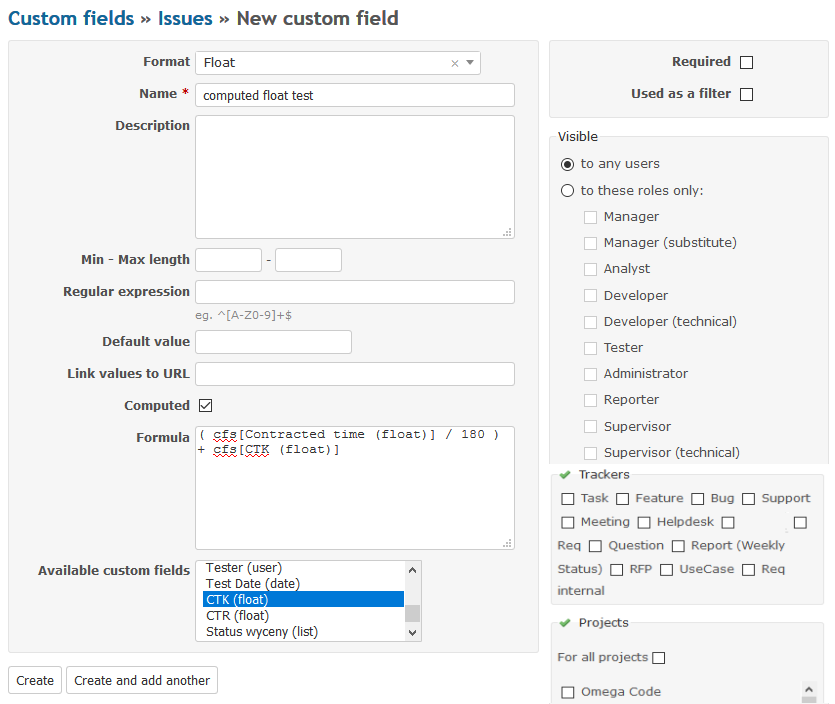
You can use Computed Custom Field plugin alongside our other plugin Project Specific Custom Field to get even more powerful effect.
Try our free Demo
Buy now*
*includes one-year of updates
Description
This plugin allows you to create a computed custom field. The value of the computed field can be set by formula and dynamically calculated on object update. You can use other custom fields in your formula by choosing them for the list of available custom fields.
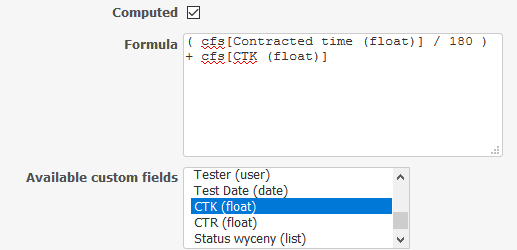
A valid formula is a valid Ruby code executed when a customized object is updated. To put a field name in the formula, double-click on an item in the list of available fields. Please notice that if you change existing formula, you need to update ALL the impacted objects to make a new formula work (e.g. you can bulk edit issues by adding a proper comment like “CF formula update”)
Examples
cfs[1]*2+cfs[2]
# means
# custom_field_value(1) * 2 + custom_field_value(2)

(cfs[1]/3.14).round(2)

if cfs[1].zero?
 cfs[2]/2
else
 cfs[3]/2
end

# For IssueCustomField
(self.estimated_hours || 0) * 2

# For ProjectCustomField
self.parent_id == 2

# If format of Custom Field is Link
"/projects/#{self.project_id.to_s}/issues/new?issue[subject]=Review+request+[##{self.id.to_s} #{self.subject}]&issue[tracker_id]=3"

# Retrieve a value from Key/value list custom field
cfs[1].try(:id)cfs[1]*2+cfs[2]
# means
# custom_field_value(1) * 2 + custom_field_value(2)
(cfs[1]/3.14).round(2)
if cfs[1].zero?
cfs[2]/2
else
cfs[3]/2
end
# For IssueCustomField
(self.estimated_hours || 0) * 2
# For ProjectCustomField
self.parent_id == 2
# If format of Custom Field is Link
"/projects/#{self.project_id.to_s}/issues/new?issue[subject]=Review+request+[##{self.id.to_s} #{self.subject}]&issue[tracker_id]=3"
# Retrieve a value from Key/value list custom field
cfs[1].try(:id)Support for writing formulas
Please understand that due the nature, complexity of the plugin and budget constraints we are not able and won’t support any issues and questions regarding writing of formulas.
For the help and reference please find the following resources:
Try our free Demo
Buy now*
*includes one-year of updates
Setup instructions
Please ALWAYS make preliminary installation and tests of the plugin on development environment before proceeding to setup on production server.
It is possible that by making some changes in formulas (like deleting objects referenced in them) you can crash your system. So it is a paramount to have a full backup of the system before making any changes and keep the regular backups afterwards as per best practices. You have been warned 😃
We do recommend that you start with some basic formulas in the beginning and then proceed with advanced one after research.
1. Credits
Redmine Computed Field is based on annikoff’ splendid work which was released to the community. Unfortunetly, project seems to be abandoned. We really liked it and decided to support it and make it better with even more features (like improving UX, adding more validations and project specific custom field functionality).
2. Installation
Before processing it is recommended to backup your Redmine instance, both files and database (!)
Follow Redmine standard plugin installation steps:
- Upload redmine_computed_custom_field/ directory to plugins/ inside Redmine root directory.
- From shell, still inside Redmine directory, run rake redmine:plugins:migrate
- Restart Redmine instance.
- Open Redmine inside your browser.
That’s it! Please refer to description for further use of the plugin.
This plugin should be compatible with original annikoff plugin latest version (1.0.7) Changes and improvements were made with backward compatibility in mind.
Try our free Demo
Buy now*
*includes one-year of updates
Changelog
2.0.1 01-02-2020
[Fix] Error migrating from older version with different plugin name

2.0.0 2-12-2020
[Feature] Compatible with Redmine 3.4 and 4.1

1.1.5 28-08-2020
[Fix] Recalculating formula exception

1.1.4 17-08-2020
[Fix] Global custom fields are now visible when creating formulas for project custom fields
[Fix] Using fields with space in name resulted in exception
[Feature] Now it's impossible to delete custom field used in other field formula

1.1.3 17-07-2020
[Feature] Formula custom fields are displayed as cfs[field_name(field_type)] for better readability, under hood formulas are still cfs[field_id] for backward compatibility

1.1.2 02-07-2020
[Feature] Formulas now can be edited

1.1.1 19-06-2020
[Fix] Available custom fields now contains only project specific fields

1.1.0 18.06.2020
[Feature] Computed fields are now compatible with project_specific_custom_field plugin
2.0.1 01-02-2020
[Fix] Error migrating from older version with different plugin name

2.0.0 2-12-2020
[Feature] Compatible with Redmine 3.4 and 4.1

1.1.5 28-08-2020
[Fix] Recalculating formula exception

1.1.4 17-08-2020
[Fix] Global custom fields are now visible when creating formulas for project custom fields
[Fix] Using fields with space in name resulted in exception
[Feature] Now it's impossible to delete custom field used in other field formula

1.1.3 17-07-2020
[Feature] Formula custom fields are displayed as cfs[field_name(field_type)] for better readability, under hood formulas are still cfs[field_id] for backward compatibility

1.1.2 02-07-2020
[Feature] Formulas now can be edited

1.1.1 19-06-2020
[Fix] Available custom fields now contains only project specific fields

1.1.0 18.06.2020
[Feature] Computed fields are now compatible with project_specific_custom_field plugin
Any question about our plugins? Please e-mail us at:
redmine.support@omegacode.pl
We’re open for your feedback and new features suggestions. There is always space for improvement!
Redmine Invoice Reminder
Make it easier to issue and propagate a notice to your customers about invoice incoming or due payments. Automatically send emails as a kind reminder based on invoices issued with Redmine Invoices plugin.
This plugin integrates with and work only with Redmine Invoices plugin (by RedmineUP) which we do recommend for any Redmine user.
Try our free Demo
Buy now*
*includes one-year of updates
Description
This plugin allows you to enable automatic emailing to your customers with invoice payment reminder based on:
- Invoice due date
- Invoice payment status (paid / unpaid)
- Invoice linked Contact (recipient)
- Contact dedicated Custom Field (CF) for the contact email address concerning the payments.
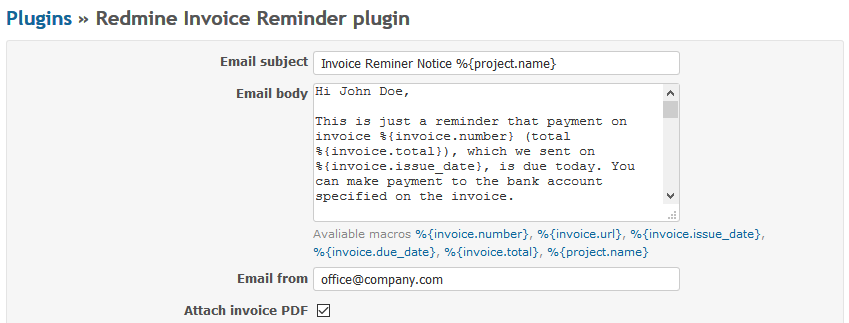
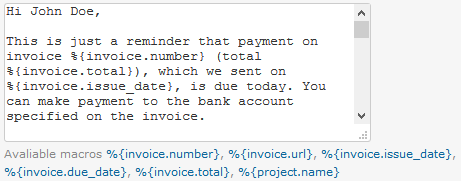
You can redact your standard email reminder template for subject and body by using macros (vaules of chosen attributes from the invoice). Invoice can be attached to the email reminder if needed.
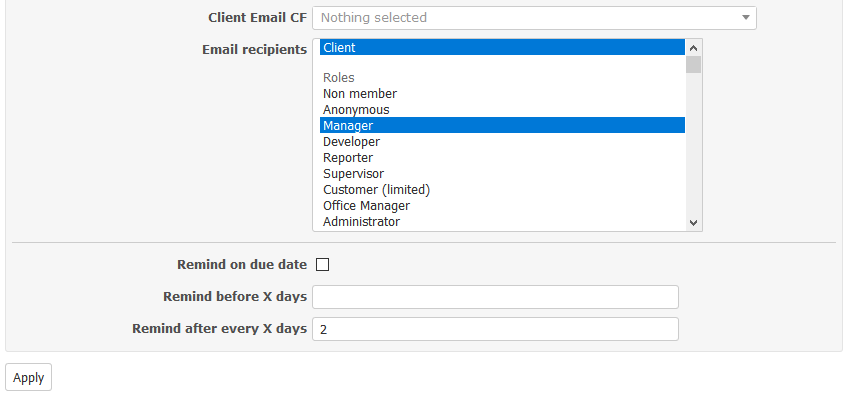
Email recipients may be configured (e.g. customer, project manager, office manager etc) and some rules regarding the reminder issuance like:
- remind on invoice due date
- remind before X days (of invoice due date)
- remind after every X days (of invoice due date)
Try our free Demo
Buy now*
*includes one-year of updates
Setup instructions
Please ALWAYS make preliminary installation and tests of the plugin on development environment before proceeding to setup on production server.
1. Installation
Before processing it is recommended to backup your Redmine instance, both files and database (!)
Follow Redmine standard plugin installation steps:
- Upload redmine_invoice_reminder/ directory to plugins/ inside Redmine root directory.
- From shell, still inside Redmine directory, run rake redmine:plugins:migrate
- Restart Redmine instance.
- Open Redmine inside your browser.
2. Configure plugin
Please set:
- email subject (you can use macros)
- email body (you can use macros)
- email address from (your email address)
- attach invoice PDF file flag (for convenience)
- client email CF (choose from the list)
- please create a custom field for Contact object which will be used for getting recipient’s email value.
- email recipients; you can choose:
- client (invoice and reminder recipient)
- user based on project roles where invoice was issued
- specific user
- rules regarding issuance of email invoice reminder
3. Configure cron
To enable automatic email sending you need to configure your system scheduler (cron) to fire the following command:
bundle exec rake redmine_invoice_reminder:send_reminders RAILS_ENV=production &> /tmp/redmine_invoice_reminder
/tmp/redmine_invoice_reminder is the place where logs will be stored (very important for testing your configuration)
Before using the plugin in production environment please DO test your configuration thoroughly. You don’t want to send your reminders (especially with invoices file attached) to wrong recipients. You have been warned 😃
Example (for Bitnami appliance under Linux - you need to adapt it to your environment):
- Open cron for editing
crontab -e
- Create the script, e.g. invoice_reminder.sh
#!/bin/bash
export PATH=/opt/bitnami/perl/bin:/opt/bitnami/git/bin:/opt/bitnami/sqlite/bin:/opt/bitnami/ruby/bin:/opt/bitnami/subversion/bin:/opt/bitnami/php/bin:/opt/bitnami/mysql/bin:/opt/bitnami/apache2/bin:/opt/bitnami/common/bin:$PATH
cd /opt/bitnami/apps/redmine/htdocs/ && bundle exec rake redmine_invoice_reminder:send_reminders RAILS_ENV=production &> /tmp/redmine_invoice_reminder
#!/bin/bash
export PATH=/opt/bitnami/perl/bin:/opt/bitnami/git/bin:/opt/bitnami/sqlite/bin:/opt/bitnami/ruby/bin:/opt/bitnami/subversion/bin:/opt/bitnami/php/bin:/opt/bitnami/mysql/bin:/opt/bitnami/apache2/bin:/opt/bitnami/common/bin:$PATH
cd /opt/bitnami/apps/redmine/htdocs/ && bundle exec rake redmine_invoice_reminder:send_reminders RAILS_ENV=production &> /tmp/redmine_invoice_reminder- Make the script executable
chmod 775 invoice_reminder.sh
- Insert the following line in the bottom of the file (all mails will be send at 6:30 AM from Monday to Friday)
30 6 * * 1-5 <pathto>/invoice_reminder.sh &
Try our free Demo
Buy now*
*includes one-year of updates
Changelog
14-02-2021 1.2.1
 - [Fix] Compatible with computed_custom_field plugin
14-02-2021 1.2.1
 - [Fix] Compatible with computed_custom_field plugin
Any question about our plugins? Please e-mail us at:
redmine.support@omegacode.pl
We’re open for your feedback and new features suggestions. There is always space for improvement!
Redmine Leaves Holidays
Make your Redmine a complete system for leaves management. Integrate your leaves approval with the system time tracking and increase the transparency of the process to everybody in your organization.
Try our free Demo
Buy now*
*includes one-year of updates
Description
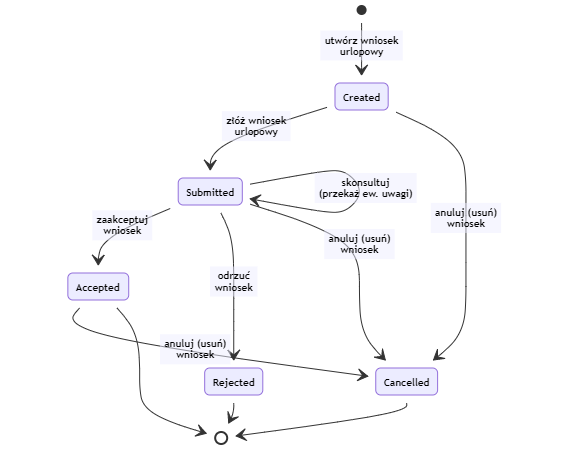
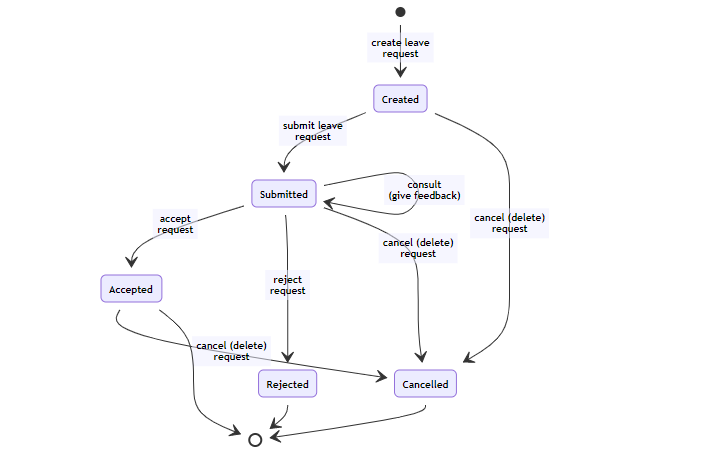
This plugin allows you to automate the process of leave management which includes submittal as well as consulting and approval of leave request.
Features:
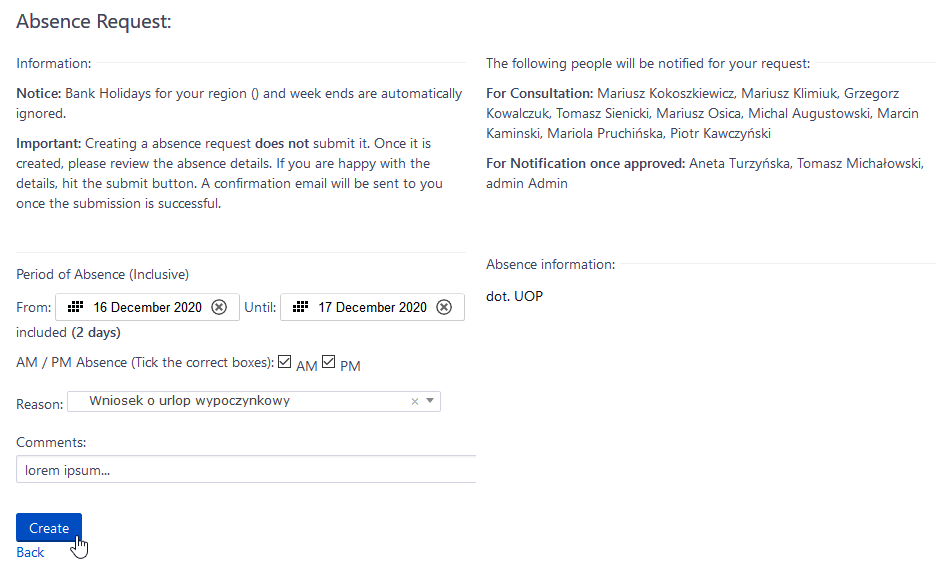
- Users can take full or half days leave, for a custom time period. They can specify if the leave is AM and/or PM
- Users can easily select a leave reason (Annual leave, sick leave…), and add a comment on their leave request
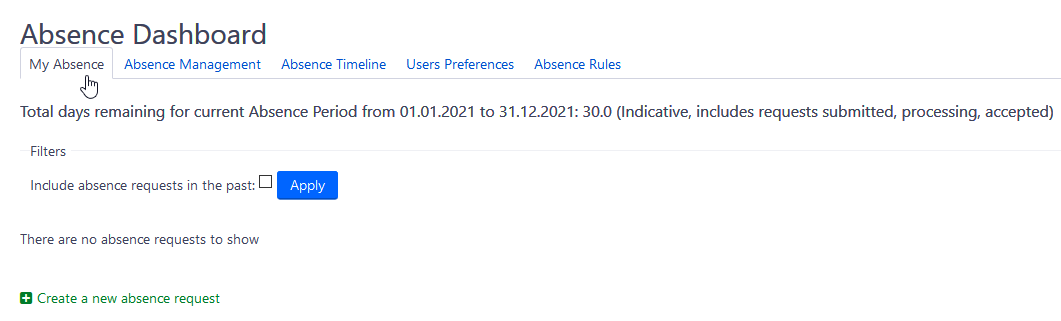
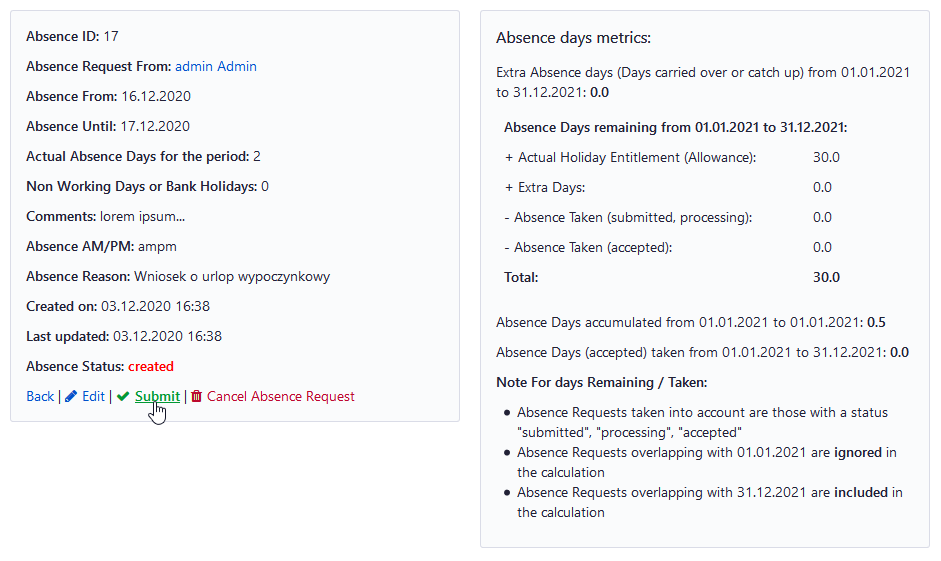
- Users can see how many days they can book as leave, on a dedicated dashboard
- Selected roles/users are notified when a user makes a leave request, or when a leave request status is updated
- Administrators can manage (add, remove) leave reasons
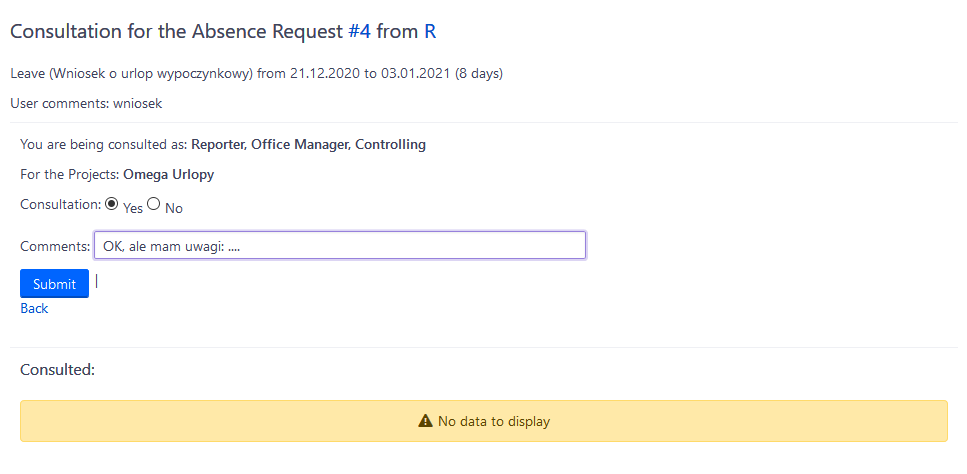
- Selected roles/users can manage (approve, reject), or be consulted for feedback (yes, no) on leave requests, depending on the user who made the leave request
- Selected roles/users can view all approved leave requests
- Selected roles/users can manage user preferences, generally or per user
- User region, for computation of bank holidays
- User weekly working hours
- User maximum number of leave days per year
- Leave renewal date for auto report of non taken leave days when this date is reached
Example of workflow:
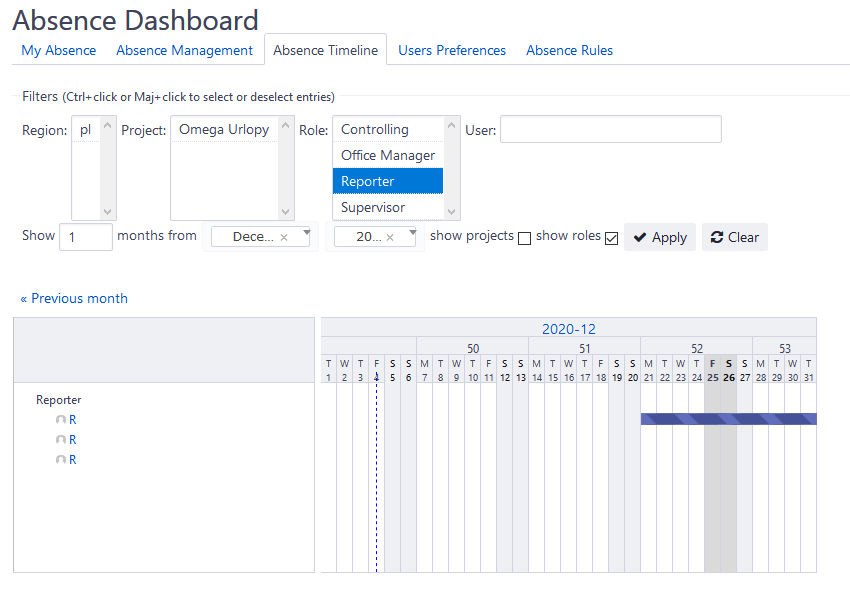
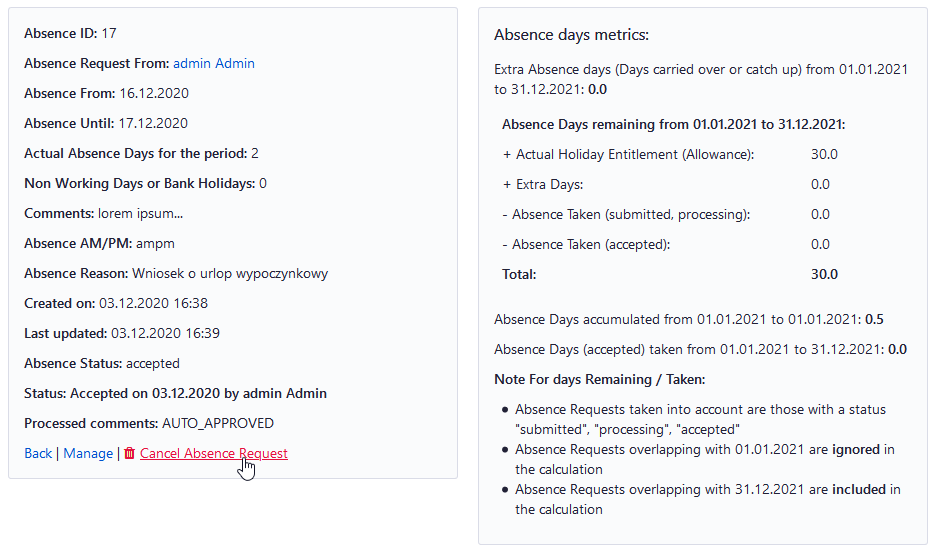
Screenshots:

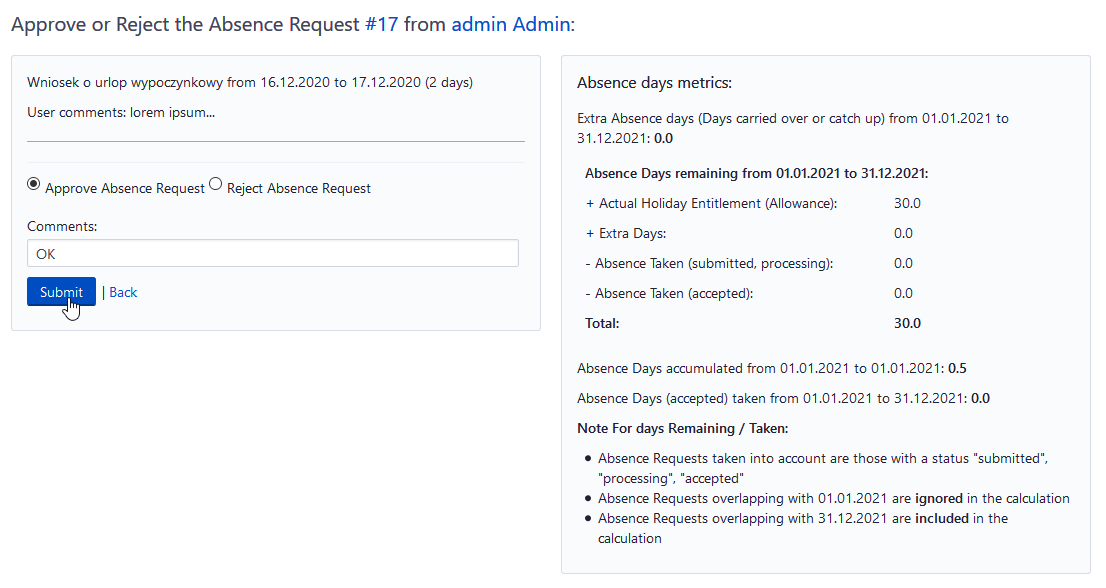
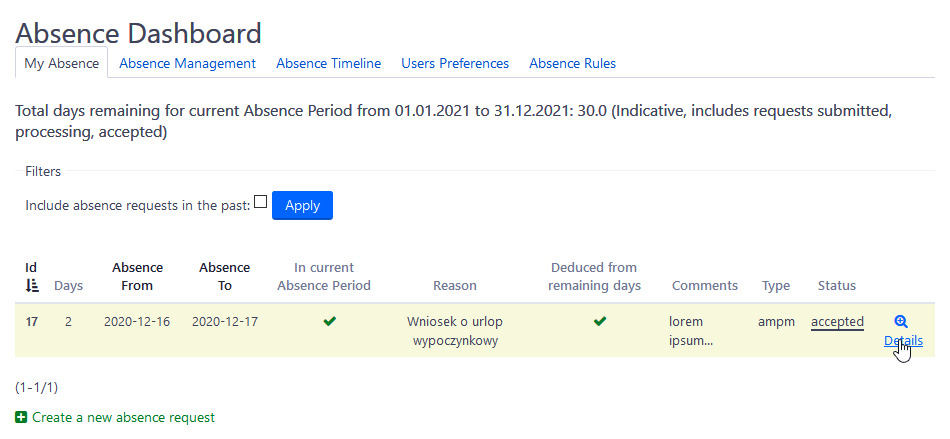
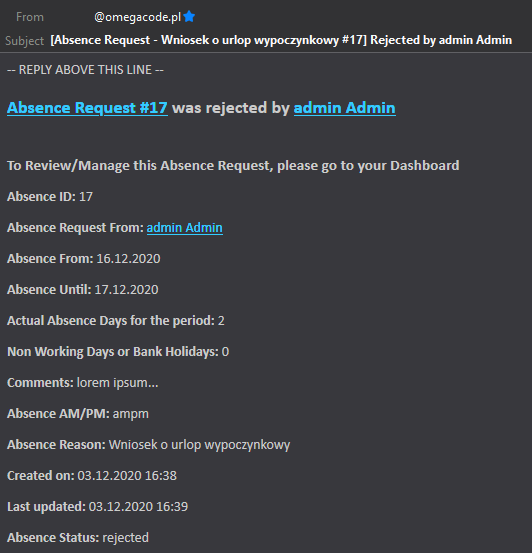
Try our free Demo
Buy now*
*includes one-year of updates
Setup instructions
Please ALWAYS make preliminary installation and tests of the plugin on development environment before proceeding to setup on production server.
1. Credits
Redmine Leaves Holidays is based on ste26054’ magnificent work which was released to the community. Unfortunetly, project seems to be abandoned. We really liked it and decided to rewrite it, support it and make it even better with even more features (like improving UX).
2. Installation
Before processing it is recommended to backup your Redmine instance, both files and database (!)
Follow Redmine standard plugin installation steps:
- Upload redmine_/ directory to plugins/ inside Redmine root directory.
- From shell, still inside Redmine directory, run rake redmine:plugins:migrate
- bundle install to install the required gems
- Restart Redmine instance.
- Open Redmine inside your browser.
2. Setup permissions
You need to configure selected Roles with the following permissions accordingly:

-
manage_user_leave_preferences: Manage specific user leave details such as:
- is allowed to create leave requests
- leave entitlement
- contract start / end date
- extra days
-
manage_leave_management_rules: Create / edit / delete leave management rules, at project level. This is used by the plugin to specify who is managed by who…
-
view_all_leave_requests: Allows to view all leave requests in the system, or get an email notification for any approved leave
-
manage leave rules: Allows to add custom fields for different types of leave requests
-
view_leave_timeline: Allows to see approved leaves on ganttt-like chart timline for convenience
3. Configure plugin
Set the following settings:
- Part 1 are obligatory for plugin to work
- Part 2 and Part 3 are optional
- Settings regarding trainings are experimental for now and not supported
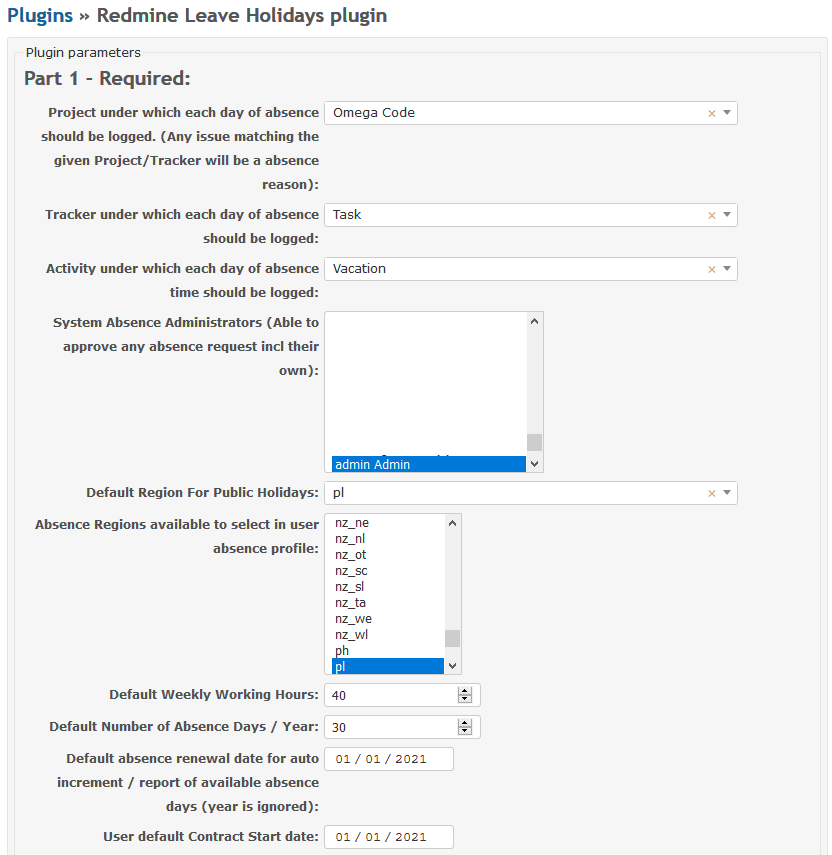
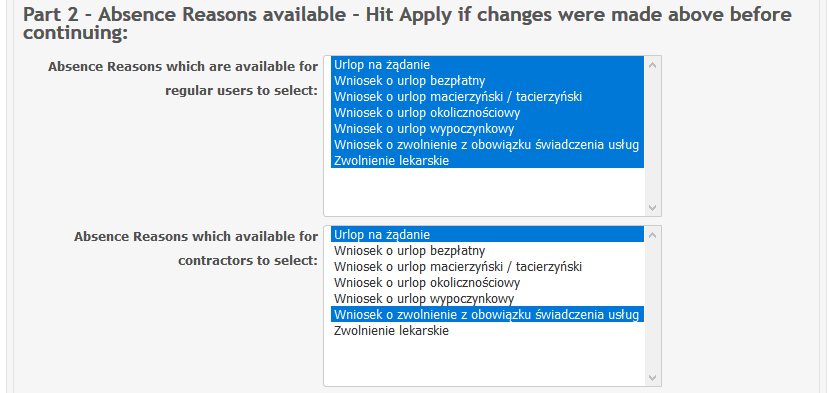
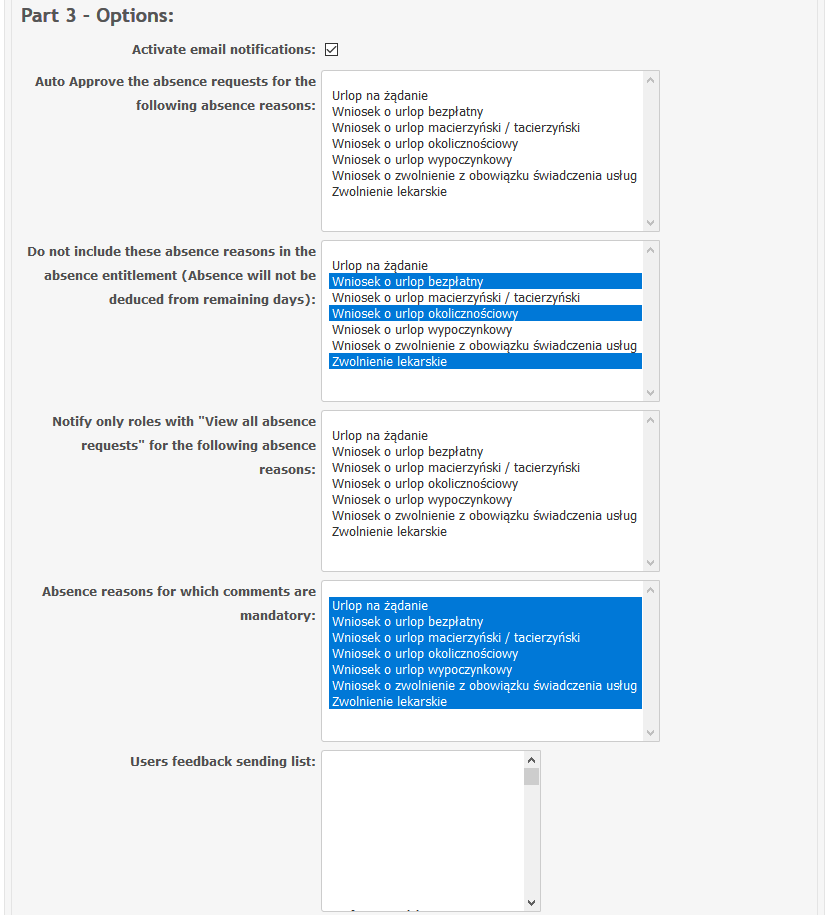
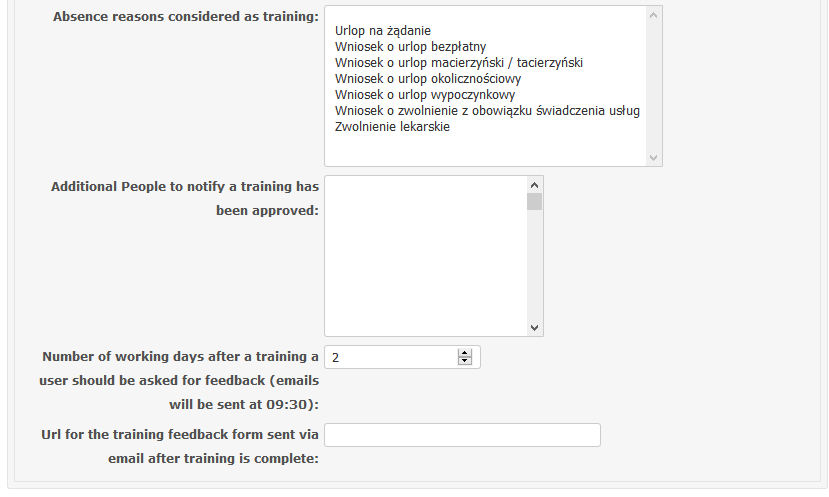
Then configure selected project dedicated for leaves management with your workflow:
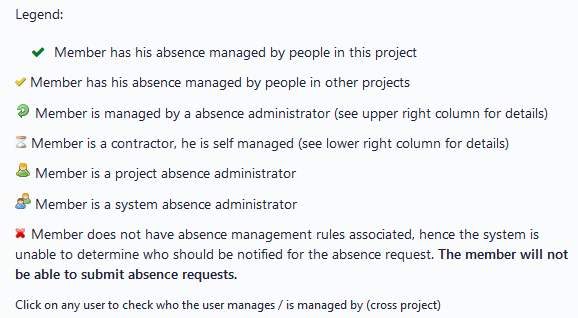
That’s it! Please refer to description for further use of the plugin.
Try our free Demo
Buy now*
*includes one-year of updates
Changelog
26-02-2021 2.0.1
 - [Fix] Multiple issues with Redmine 4.1

10-02-2021 2.0.0
 - [Feature] Compatible with Redmine 3.4 and 4.1
 - [Fix] Set absence administrators had no effect
 - [Fix] Delete absence management rules had no effect

07-12-2020 1.0.4
 - [Fix] Ticket for leaves/holidays always inserted with 0 hours

06-11-2020 1.0.3
 - [Fix] Checkbox 'Show rejected' has no effect

05-11-2020 1.0.2
 - [Fix] Internal exceptions at multiple places
26-02-2021 2.0.1
 - [Fix] Multiple issues with Redmine 4.1

10-02-2021 2.0.0
 - [Feature] Compatible with Redmine 3.4 and 4.1
 - [Fix] Set absence administrators had no effect
 - [Fix] Delete absence management rules had no effect

07-12-2020 1.0.4
 - [Fix] Ticket for leaves/holidays always inserted with 0 hours

06-11-2020 1.0.3
 - [Fix] Checkbox 'Show rejected' has no effect

05-11-2020 1.0.2
 - [Fix] Internal exceptions at multiple places
Any question about our plugins? Please e-mail us at:
redmine.support@omegacode.pll)
We’re open for your feedback and new features suggestions. There is always space for improvement!
TEMPLATE
Name
Description
Try our free Demo
Buy now*
*includes one-year of updates
Description
Description
Try our free Demo
Buy now*
*includes one-year of updates
Setup instructions
Please ALWAYS make preliminary installation and tests of the plugin on development environment before proceeding to setup on production server.
1. Credits
Redmine Project Specific Field is based on ande3577’ work which was released by him to the community. Unfortunetly, project seems to be abandoned. We really liked it and decided to rewrite it, support it and make it even better with even more features (like adding workflow and computed CF functionality).
2. Installation
Before processing it is recommended to backup your Redmine instance, both files and database (!)
Follow Redmine standard plugin installation steps:
- Upload redmine_/ directory to plugins/ inside Redmine root directory.
- From shell, still inside Redmine directory, run rake redmine:plugins:migrate
- Restart Redmine instance.
- Open Redmine inside your browser.
2. Setup permissions
That’s it! Please refer to description for further use of the plugin.
Try our free Demo
Buy now*
*includes one-year of updates
Changelog
Any question about our plugins? Please e-mail us at:
redmine.support@omegacode.pl
We’re open for your feedback and new features suggestions. There is always space for improvement!
Notes:
https://github.com/ande3577/redmine_project_specific_custom_field
https://github.com/edavis10/redmine-budget-plugin
https://github.com/annikoff/redmine_plugin_computed_custom_field